


내부 자료로 작성했던 건데~!
다른 분들도 재미있어 할꺼 같아서 올려요 :)
This is some information per bond mode.
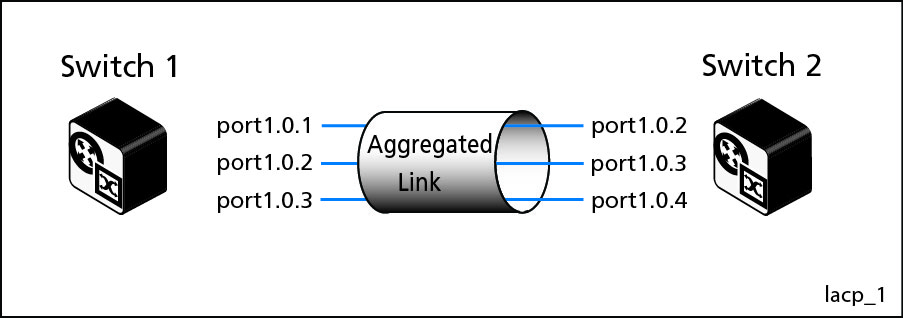
#1. Bond mode 4 (Active-Backup)
- LACP by eth2 and eth3
Here is real MAC from switch
#1
vagrant@ansible-vyos01:~$ cat /proc/net/bonding/bond0
Ethernet Channel Bonding Driver: v3.7.1 (April 27, 2011)
Bonding Mode: IEEE 802.3ad Dynamic link aggregation
Transmit Hash Policy: layer2 (0)
MII Status: up
MII Polling Interval (ms): 250
Up Delay (ms): 0
Down Delay (ms): 0
802.3ad info
LACP rate: slow
Min links: 0
Aggregator selection policy (ad_select): stable
Active Aggregator Info:
Aggregator ID: 1
Number of ports:
2
Actor Key: 17
Partner Key: 17
Partner Mac
Address: 08:00:27:d3:c8:d8
Slave Interface: eth2
MII Status: up
Speed: 1000 Mbps
Duplex: full
Link Failure Count: 0
Permanent HW addr: 08:00:27:31:83:08
Aggregator ID: 1
Slave queue ID: 0
Slave Interface: eth3
MII Status: up
Speed: 1000 Mbps
Duplex: full
Link Failure Count: 0
Permanent HW addr: 08:00:27:94:2a:fb
Aggregator ID: 1
Slave queue ID: 0
Here is real MAC from switch
#2
vagrant@ansible-vyos02:~$ cat /proc/net/bonding/bond0
Ethernet Channel Bonding Driver: v3.7.1 (April 27, 2011)
Bonding Mode: IEEE 802.3ad Dynamic link aggregation
Transmit Hash Policy: layer2 (0)
MII Status: up
MII Polling Interval (ms): 250
Up Delay (ms): 0
Down Delay (ms): 0
802.3ad info
LACP rate: slow
Min links: 0
Aggregator selection policy (ad_select): stable
Active Aggregator Info:
Aggregator ID: 1
Number of ports:
2
Actor Key: 17
Partner Key: 17
Partner Mac
Address: 08:00:27:31:83:08
Slave Interface: eth2
MII Status: up
Speed: 1000 Mbps
Duplex: full
Link Failure Count: 0
Permanent HW addr: 08:00:27:d3:c8:d8
Aggregator ID: 1
Slave queue ID: 0
Slave Interface: eth3
MII Status: up
Speed: 1000 Mbps
Duplex: full
Link Failure Count: 0
Permanent HW addr: 08:00:27:b3:34:0f
Aggregator ID: 1
Slave queue ID: 0
And Debug from both.
Switch #1 on eth2
1590.199790 08:00:27:31:83:08 -> 01:80:c2:00:00:02 LACP Link Aggregation
Control Protocol
1590.400544 08:00:27:d3:c8:d8
-> 01:80:c2:00:00:02 LACP Link Aggregation Control Protocol
1620.199776 08:00:27:31:83:08 -> 01:80:c2:00:00:02 LACP Link Aggregation
Control Protocol
1620.399886 08:00:27:d3:c8:d8
-> 01:80:c2:00:00:02 LACP Link Aggregation Control Protocol
1650.210313 08:00:27:31:83:08 -> 01:80:c2:00:00:02 LACP Link Aggregation
Control Protocol
1650.399770 08:00:27:d3:c8:d8
-> 01:80:c2:00:00:02 LACP Link Aggregation Control Protocol
Switch #1 on eth3
1500.149660 08:00:27:94:2a:fb
-> 01:80:c2:00:00:02 LACP Link Aggregation Control Protocol
1500.649315 08:00:27:b3:34:0f -> 01:80:c2:00:00:02 LACP Link Aggregation
Control Protocol
1530.149616 08:00:27:94:2a:fb
-> 01:80:c2:00:00:02 LACP Link Aggregation Control Protocol
1530.649637 08:00:27:b3:34:0f -> 01:80:c2:00:00:02 LACP Link Aggregation
Control Protocol
1560.149682 08:00:27:94:2a:fb
-> 01:80:c2:00:00:02 LACP Link Aggregation Control Protocol
1560.649534 08:00:27:b3:34:0f -> 01:80:c2:00:00:02 LACP Link Aggregation
Control Protocol
1590.149482 08:00:27:94:2a:fb
-> 01:80:c2:00:00:02 LACP Link Aggregation Control Protocol
1590.650209 08:00:27:b3:34:0f -> 01:80:c2:00:00:02 LACP Link Aggregation
Control Protocol
AND important thing is 01:80:c2:00:00:02 (Fixed multicast
Address)
It is really cool isn’t it?
|
01-80-C2-00-00-02
|
0x8809
|
Ethernet OAM Protocol IEEE 802.3ah (A.K.A.
"slow protocols")
|
Here is more info about 802.3ad and ah too.
#2. Bond mode 1 (Active-Backup)
You may already know what it is.
However there is some tweak for compatible option.
cat /etc/sysconfig/network-scripts/ifcfg-bond0
<snipped>
BONDING_OPTS="miimon=100
mode=active-backup fail_over_mac=1"
2-2.fail_over_mac=0 (default)
MAC per
interface
-
All of interface are same MAC (from active INT)
[vagrant@ansible-server
~]$ ifconfig
bond0:
flags=5187<UP,BROADCAST,RUNNING,MASTER,MULTICAST> mtu 1500
inet 10.10.1.10 netmask 255.255.255.0 broadcast 10.10.1.255
inet6 fe80::a00:27ff:fe8e:98b8 prefixlen 64 scopeid
0x20<link>
ether 08:00:27:8e:98:b8
txqueuelen 1000 (Ethernet)
RX packets 0 bytes 0 (0.0 B)
RX errors 0 dropped 0 overruns 0 frame 0
TX packets 8 bytes 648 (648.0 B)
TX errors 0 dropped 0 overruns 0 carrier 0 collisions 0
eth2:
flags=6211<UP,BROADCAST,RUNNING,SLAVE,MULTICAST> mtu 1500
ether 08:00:27:8e:98:b8
txqueuelen 1000 (Ethernet)
RX packets 0 bytes 0 (0.0 B)
RX errors 0 dropped 0 overruns 0 frame 0
TX packets 15 bytes 1176 (1.1 KiB)
TX errors 0 dropped 0 overruns 0 carrier 0 collisions 0
eth3:
flags=6211<UP,BROADCAST,RUNNING,SLAVE,MULTICAST> mtu 1500
ether 08:00:27:8e:98:b8
txqueuelen 1000 (Ethernet)
RX packets 0 bytes 0 (0.0 B)
RX errors 0 dropped 0 overruns 0 frame 0
TX packets 13 bytes 1086 (1.0 KiB)
TX errors 0 dropped 0 overruns 0 carrier 0 collisions 0
Bonding info
[vagrant@ansible-server
~]$ cat /proc/net/bonding/bond0
Ethernet Channel Bonding
Driver: v3.7.1 (April 27, 2011)
Bonding Mode:
fault-tolerance (active-backup)
Primary Slave: None
Currently Active Slave:
eth2
MII Status: up
MII Polling Interval (ms):
100
Up Delay (ms): 0
Down Delay (ms): 0
Slave Interface: eth2
MII Status: up
Speed: 1000 Mbps
Duplex: full
Link Failure Count: 0
Permanent HW addr:
08:00:27:8e:98:b8
Slave queue ID: 0
Slave Interface: eth3
MII Status: up
Speed: 1000 Mbps
Duplex: full
Link Failure Count: 0
Permanent HW addr:
08:00:27:ea:f6:6b
Slave queue ID: 0
2-2. fail_over_mac=1
MAC per
interface
-
Bond0 and active interface have same MAC.
-
However standby MAC is real MAC
[vagrant@ansible-server
~]$ ifconfig
bond0:
flags=5187<UP,BROADCAST,RUNNING,MASTER,MULTICAST> mtu 1500
inet 10.10.1.10 netmask 255.255.255.0 broadcast 10.10.1.255
inet6 fe80::a00:27ff:fe8e:98b8 prefixlen 64 scopeid
0x20<link>
ether 08:00:27:8e:98:b8
txqueuelen 1000 (Ethernet)
RX packets 0 bytes 0 (0.0 B)
RX errors 0 dropped 0 overruns 0 frame 0
TX packets 9 bytes 724 (724.0 B)
TX errors 0 dropped 0 overruns 0 carrier 0 collisions 0
eth2:
flags=6211<UP,BROADCAST,RUNNING,SLAVE,MULTICAST> mtu 1500
ether 08:00:27:8e:98:b8
txqueuelen 1000 (Ethernet)
RX packets 0 bytes 0 (0.0 B)
RX errors 0 dropped 0 overruns 0 frame 0
TX
packets 24 bytes 1900 (1.8 KiB)
TX errors 0 dropped 0 overruns 0 carrier 0 collisions 0
eth3:
flags=6211<UP,BROADCAST,RUNNING,SLAVE,MULTICAST> mtu 1500
ether 08:00:27:ea:f6:6b
txqueuelen 1000 (Ethernet)
RX packets 0 bytes 0 (0.0 B)
RX errors 0 dropped 0 overruns 0 frame 0
TX packets 13 bytes 1086 (1.0 KiB)
TX errors 0 dropped 0 overruns 0 carrier 0 collisions 0
Bonding info
[vagrant@ansible-server
~]$ cat /proc/net/bonding/bond0
Ethernet Channel Bonding
Driver: v3.7.1 (April 27, 2011)
Bonding Mode:
fault-tolerance (active-backup)
(fail_over_mac active)
Primary Slave: None
Currently Active Slave:
eth2
MII Status: up
MII Polling Interval (ms):
100
Up Delay (ms): 0
Down Delay (ms): 0
Slave Interface: eth2
MII Status: up
Speed: 1000 Mbps
Duplex: full
Link Failure Count: 0
Permanent HW addr:
08:00:27:8e:98:b8
Slave queue ID: 0
Slave Interface: eth3
MII Status: up
Speed: 1000 Mbps
Duplex: full
Link Failure Count: 0
Permanent HW addr:
08:00:27:ea:f6:6b
Slave queue ID: 0
What if active interface is down?
- Bond0’s MAC change to standby’s MAC.
i.e. MAC is changed the perspective of receiver(switch?)
eth3:
flags=6211<UP,BROADCAST,RUNNING,SLAVE,MULTICAST> mtu 1500
ether 08:00:27:ea:f6:6b
txqueuelen 1000 (Ethernet)
RX
packets 0 bytes 0 (0.0 B)
RX
errors 0 dropped 0 overruns 0 frame 0
TX
packets 27 bytes 2160 (2.1 KiB)
TX
errors 0 dropped 0 overruns 0 carrier 0 collisions 0
bond0:
flags=5187<UP,BROADCAST,RUNNING,MASTER,MULTICAST> mtu 1500
inet
10.10.1.10 netmask 255.255.255.0 broadcast 10.10.1.255
inet6 fe80::a00:27ff:feea:f66b prefixlen 64 scopeid
0x20<link>
ether 08:00:27:ea:f6:6b
txqueuelen 1000 (Ethernet)
RX
packets 0 bytes 0 (0.0 B)
RX
errors 0 dropped 0 overruns 0 frame 0
TX
packets 21 bytes 1688 (1.6 KiB)
TX
errors 0 dropped 0 overruns 0 carrier 0 collisions 0
And this mode have drawback. If you have interest about it,
please refer to below.
‘Using "fail_over_mac=active" on
Ethernet devices has other drawbacks, e.g. if gratuitous ARP is lost or
incorrectly processed after a failover, bond is not accessible until it sends a
packet.’
Reference:
Source Code:
https://gitlab.eurecom.fr/oai/odroid-linux-3.10.y-rt/commit/495d9de1ad472cd215ac72bcfa8ac6252af02e16
